How to abort a freeze software upgrade ?
Recently, on a mission with a client for a cluster deployment. I wanted to update the Esxi hypervisor version. I got the wrong Iso file. This still begins the pre-upgrade process. However the upgrade is stuck at 0% making the upgrade unavailable. I advise you to contact support if this happens to you.
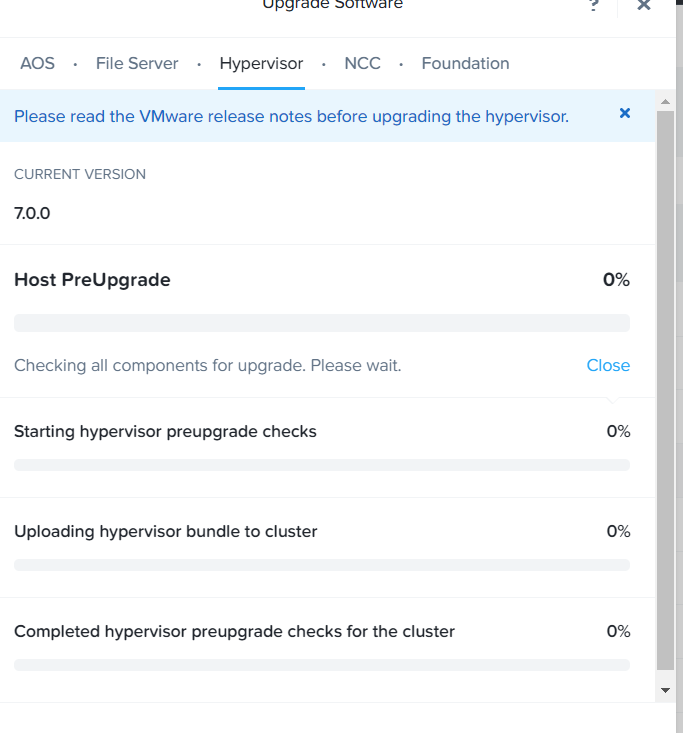
→ Connnect to one the CVMs or VIP.
→ run command : ecli task.list (to check if you don’t have any task running)
nutanix@NTNX-J7004NZB-A-CVM:10.230.0.145:~$ ecli task.list
Task UUID                             Parent Task UUID                      Comp                                             onent  Sequence-id  Type         Status
e49339d2-49f3-46fa-6146-41b1b7e2773f  b65c5bcc-b763-4a3f-b525-e24cae729d83  NCC                                                     230          HealthCheck  kSucceeded
40024999-ed1a-45f7-58c9-5dc620e5b1e9  b65c5bcc-b763-4a3f-b525-e24cae729d83  NCC                                                     229          HealthCheck  kSucceeded
c9eaf967-6855-49ec-76a6-cdb0e96efc05  b65c5bcc-b763-4a3f-b525-e24cae729d83  NCC                                                     228          HealthCheck  kSucceeded
d9933e81-2b53-4faa-67bb-f42175703451  b65c5bcc-b763-4a3f-b525-e24cae729d83  NCC                                                     227          HealthCheck  kSucceeded
b65c5bcc-b763-4a3f-b525-e24cae729d83                                        NCC                                                     226          HealthCheck  kSucceeded
ea7ef1c9-22c0-42d5-6b83-53d8b7a55af5  dadb2d2e-66de-42ca-8bdb-ce47042fef03  NCC
→ run command : progress_monitor_cli –fetchall | egrep « entity_id|entity_type|operation » (to déterminate the ID of opération)
nutanix@NTNX-J7004NZB-A-CVM:10.230.0.145:~$ progress_monitor_cli --fetchall | egrep "entity_id|entity_type|operation" 2022-08-10 20:25:26,580Z:25581(0x7fed618e0b40):ZOO_INFO@zookeeper_init@980: Initiating client connection, host=zk1:9876,zk2:9876,zk3:9876 sessionTimeout=20000 watcher=0x7fed6a57efc0 sessionId=0 sessionPasswd= context=0x555dd90f8040 flags=0
2022-08-10 20:25:26,583Z:25581(0x7fed6184d700):ZOO_INFO@zookeeper_interest@1926: Connecting to server 10.230.0.147:9876
2022-08-10 20:25:26,583Z:25581(0x7fed6184d700):ZOO_INFO@zookeeper_interest@1963: Zookeeper handle state changed to ZOO_CONNECTING_STATE for socket [10.230.0.147:9876]
2022-08-10 20:25:26,583Z:25581(0x7fed6184d700):ZOO_INFO@check_events@2171: initiated connection to server [10.230.0.147:9876]
2022-08-10 20:25:26,590Z:25581(0x7fed6184d700):ZOO_INFO@check_events@2219: session establishment complete on server [10.230.0.147:9876], sessionId=0x3828713444121eb, negotiated timeout=20000
operation: kUpgrade_Hypervisor
entity_type: kCluster
entity_id: "5551595187730511991"
→ run command : progress_monitor_cli –entity_id= »5551595187730511991″ –entity_type=kcluster –operation=kupgrade_hypervisor -delete (to remove the operation)
nutanix@NTNX-J7004NZB-A-CVM:10.230.0.145:~$ progress_monitor_cli --entity_id="5551595187730511991" --entity_type=kcluster --operation=kupgrade_hypervisor -delete
2022-08-10 20:26:22,366Z:27162(0x7fbe7e39eb40):ZOO_INFO@zookeeper_init@980: Initiating client connection, host=zk1:9876,zk2:9876,zk3:9876 sessionTimeout=20000 watcher=0x7fbe8703cfc0 sessionId=0 sessionPasswd= context=0x55bbe9f08040 flags=0
2022-08-10 20:26:22,368Z:27162(0x7fbe7e30b700):ZOO_INFO@zookeeper_interest@1926: Connecting to server 10.230.0.149:9876
2022-08-10 20:26:22,368Z:27162(0x7fbe7e30b700):ZOO_INFO@zookeeper_interest@1963: Zookeeper handle state changed to ZOO_CONNECTING_STATE for socket [10.230.0.149:9876]
2022-08-10 20:26:22,369Z:27162(0x7fbe7e30b700):ZOO_INFO@check_events@2171: initiated connection to server [10.230.0.149:9876]
2022-08-10 20:26:22,370Z:27162(0x7fbe7e30b700):ZOO_INFO@check_events@2219: session establishment complete on server [10.230.0.149:9876], sessionId=0x282873e44fd1dd8, negotiated timeout=20000
F20220810 20:26:22.370441Z 27162 progress_monitor_cli.cc:353] Check failed: false Unknown operation: kupgrade_hypervisor
*** Check failure stack trace: ***
First FATAL tid: 27162
Installed ExitTimer with timeout 30 secs and interval 5 secs
Leak checks complete
Flushed log files
Initialized FiberPool BacktraceGenerator
Collected stack-frames for threads
Collected stack-frames for all Fibers
Symbolized all thread stack-frames
Symbolized all fiber stack-frames
Obtained stack traces of threads responding to SIGPROF
Collected stack traces from /proc for unresponsive threads
Stack traces are generated at /home/nutanix/data/cores/progress_monito.27162.20220810-222623.stack_trace.txt
Stacktrace collection complete